
NirSoft OutlookAttachView (64-bit) v3.01

Freeware
Vista / Win10 / Win7 / Win8 / WinXP
Vista / Win10 / Win7 / Win8 / WinXP
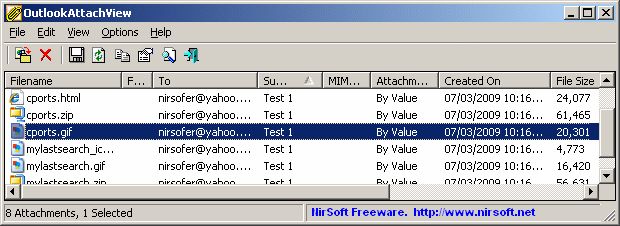
NirSoft OutlookAttachView er et freeware værktøj, der kan scanne alle gemte emails i Outlook, og efterfølgende vise en liste over alle vedhæftede filer fra eksisterende emails. Via denne list, kan du nemt udvælge flere vedhæftede filer og gemme dem i specifikke mapper. Du kan også slette vedhæftede filer via OutlookAttachView, men vær opmærksom på, at det også vil slette filerne helt fra Outlook.
Du kan desuden gemme den detaljerede liste over vedhæftede filer som TEXT-, HTML-, XML- og CSV-fil.
Bemærk, dette er en 64-bit-udgave. Se under "Andre udgaver:" for flere variationer.
Du kan desuden gemme den detaljerede liste over vedhæftede filer som TEXT-, HTML-, XML- og CSV-fil.
Bemærk, dette er en 64-bit-udgave. Se under "Andre udgaver:" for flere variationer.
Skærmbilleder:
Andre udgaver:
HTML kode til at linke til denne side:
Licenstype
Freeware1
Forfatterens hjemmeside
Besøg forfatterens side
Dato tilføjet
19.5.2017
Downloads
6
Filstørrelse
155.14 kB
(<1min @ 1Mbps)
Understøttede sprog
English
Dutch
Operativsystemer
Vista / Win10 / Win7 / Win8 / WinXP1
1Licens og information om operativ system er baseret på den seneste version af softwaren.
NirSoft OutlookAttachView (64-bit) v3.01(Seneste stabil version) 19.5.2017
NirSoft OutlookAttachView (64-bit) v3.00 8.3.2017
NirSoft OutlookAttachView (64-bit) v2.97 22.1.2017
NirSoft OutlookAttachView (64-bit) v2.87 8.1.2016
NirSoft OutlookAttachView (64-bit) v2.81 21.8.2015
NirSoft OutlookAttachView (64-bit) v2.77 14.4.2015
NirSoft OutlookAttachView (64-bit) v2.76 14.3.2015
NirSoft OutlookAttachView (64-bit) v2.75 2.1.2015
NirSoft OutlookAttachView (64-bit) v2.74 11.12.2014
NirSoft OutlookAttachView (64-bit) v2.73 1.12.2014
NirSoft OutlookAttachView (64-bit) v2.72 6.11.2014
NirSoft OutlookAttachView (64-bit) v2.71 16.9.2014
NirSoft OutlookAttachView (64-bit) v2.70 27.8.2014
NirSoft OutlookAttachView (64-bit) v2.69 17.8.2014
NirSoft OutlookAttachView (64-bit) v2.67 3.4.2014
NirSoft OutlookAttachView (64-bit) v2.63 22.12.2013
NirSoft OutlookAttachView (64-bit) v2.62 19.11.2013
NirSoft OutlookAttachView (64-bit) v2.61 12.9.2013
NirSoft OutlookAttachView (64-bit) v2.60 20.8.2013
NirSoft OutlookAttachView (64-bit) v2.56 3.8.2013
NirSoft OutlookAttachView (64-bit) v2.55 1.7.2013
NirSoft OutlookAttachView (64-bit) v2.51 13.6.2013
NirSoft OutlookAttachView (64-bit) v2.50 30.5.2013
NirSoft OutlookAttachView (64-bit) v2.47 13.5.2013
NirSoft OutlookAttachView (64-bit) v2.46 12.4.2013
NirSoft OutlookAttachView (64-bit) v2.45 21.3.2013
NirSoft OutlookAttachView (64-bit) v2.43 11.2.2013
NirSoft OutlookAttachView (64-bit) v2.42 24.1.2013
NirSoft OutlookAttachView (64-bit) v2.41 2.12.2012
NirSoft OutlookAttachView (64-bit) v2.40 7.11.2012
NirSoft OutlookAttachView (64-bit) v2.38 10.10.2012
NirSoft OutlookAttachView (64-bit) v2.37 27.8.2012
NirSoft OutlookAttachView (64-bit) v2.36 13.8.2012
NirSoft OutlookAttachView (64-bit) v2.35 2.7.2012
NirSoft OutlookAttachView (64-bit) v2.32 26.6.2012
NirSoft OutlookAttachView (64-bit) v2.31 14.5.2012
NirSoft OutlookAttachView (64-bit) v2.30 24.4.2012
NirSoft OutlookAttachView (64-bit) v2.25 10.4.2012
NirSoft OutlookAttachView (64-bit) v2.20 19.3.2012
NirSoft OutlookAttachView (64-bit) v2.15 6.3.2012
NirSoft OutlookAttachView (64-bit) v2.11 24.1.2012
NirSoft OutlookAttachView (64-bit) v2.10 7.1.2012
NirSoft OutlookAttachView (64-bit) v2.05 11.12.2011
(Endnu ikke nogen brugervurderinger)